Multi-Carrier
Shipping Integration
Custom shipping software development and carrier API integration for businesses that need reliable shipping automation, multi-carrier shipping, shipment processing, tracking, shipping labels and logistics workflows. Integrate carriers such as Asendia, DHL, DPD and UPS into a scalable shipping platform.

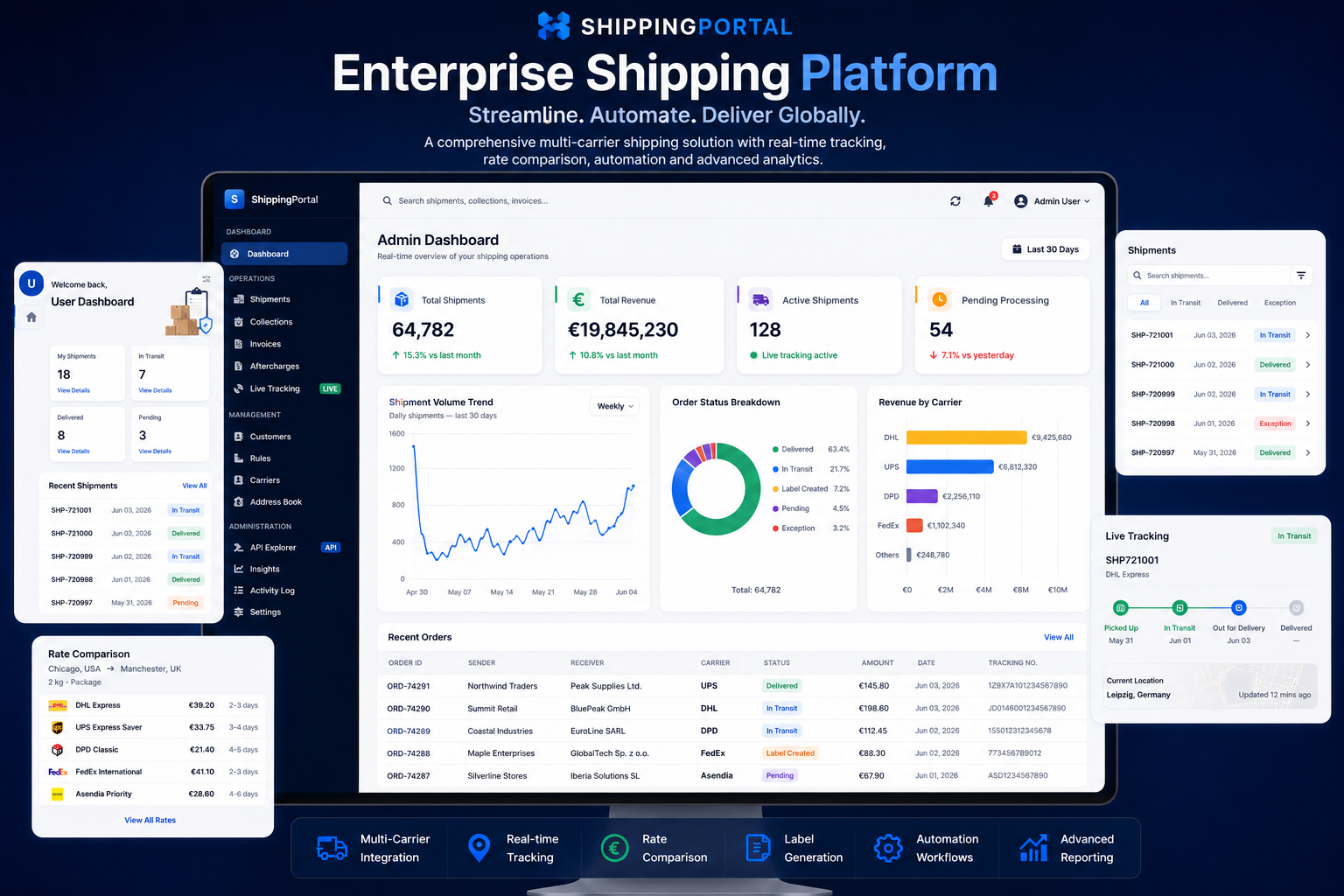
Custom shipping software development for businesses that need scalable shipping automation, multi-carrier shipping, carrier API integration and reliable logistics workflows. Build shipping platforms for shipment processing, shipping labels, tracking, rates, package management and automated shipment status updates.
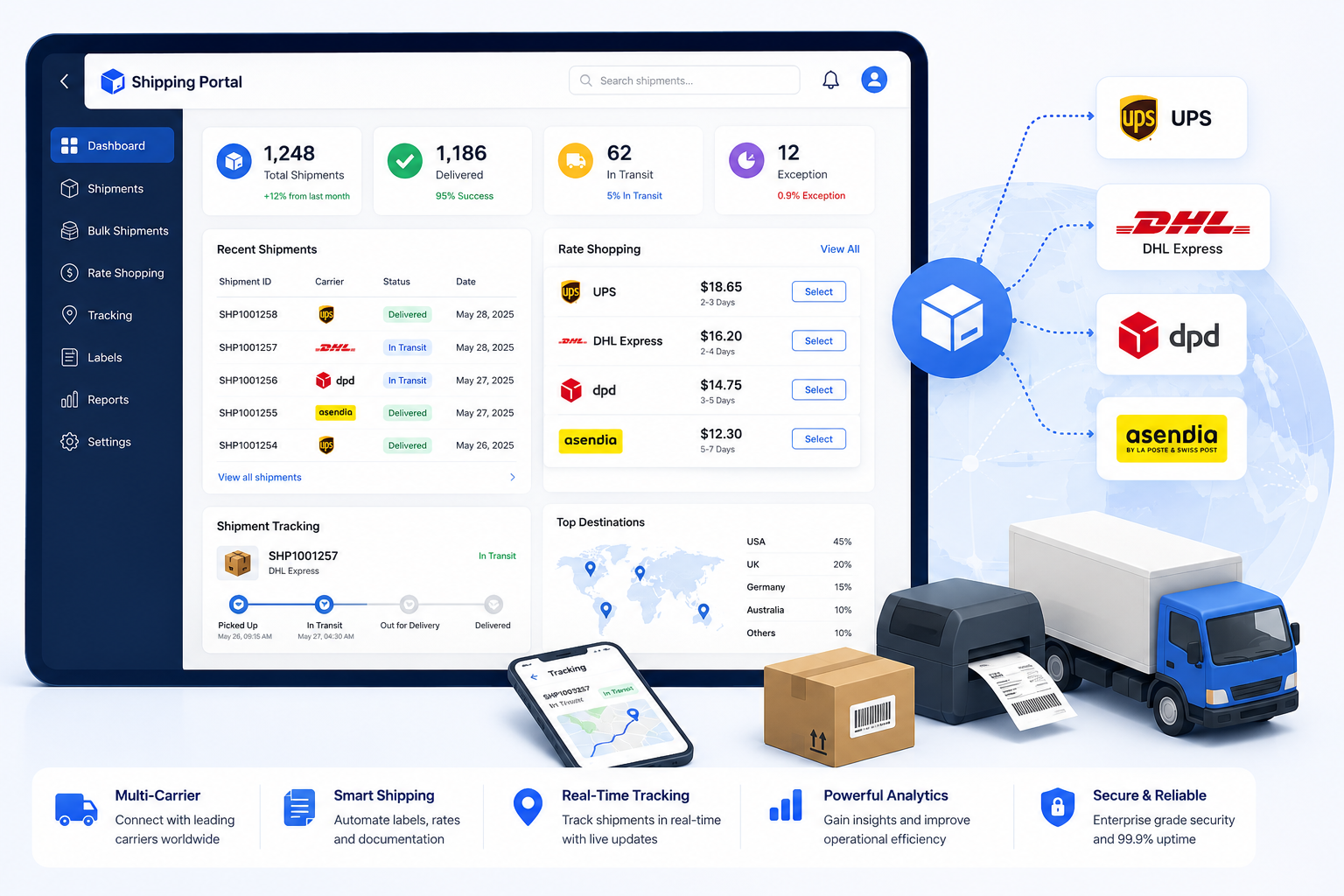
Horizon Softwares develops custom shipping software and logistics platforms that connect your business with multiple shipping carriers through reliable API integrations. We build shipping workflows around your operational requirements, including shipment creation, carrier selection, shipping rates, package management, shipping label generation, tracking and automated shipment status updates. Whether you need a new shipping management platform, want to integrate shipping APIs into an existing application, or need to modernize an existing logistics system, we can build the solution around your business processes.
A centralized shipping dashboard providing visibility into shipments, carrier services, processing status, tracking information and logistics operations. The platform brings multi-carrier shipping, shipment automation, rate management, label generation and tracking into a unified shipping workflow. It can connect with carrier APIs such as Asendia, UPS, DHL and DPD to create shipments, retrieve available services and rates, generate shipping labels and synchronize tracking and delivery statuses. Asendia shipping integration can be incorporated into the same workflow alongside other carriers, allowing businesses to manage carrier-specific shipping operations through a centralized shipping platform. The platform can also integrate with existing order management, ERP and business applications, allowing shipment processing and logistics operations to be managed through a consistent, automated workflow.
Build scalable shipping software with carrier API integration, shipping API integration, shipment automation, shipping labels, rates, package management and real-time tracking. Connect carriers such as Asendia, UPS, DHL and DPD to automate shipment creation, service selection, label generation and tracking updates. Integrate the shipping workflow with existing order management, ERP and business applications to create a centralized logistics operation.
Create and process shipments through automated shipping workflows that connect your business application with carrier APIs. Capture sender and recipient addresses, package dimensions, weights, quantities and shipping services, then validate and submit the shipment information to the selected carrier. Shipping API integration allows shipment creation to become part of an automated order-to-delivery workflow rather than requiring users to manually enter shipment information into individual carrier portals. The integration can handle carrier service selection, shipment data mapping, package information, shipping rates, label generation and tracking references while maintaining a consistent workflow across multiple carriers. This makes it possible to connect custom shipping software with existing order management systems, ERP platforms and other business applications.
Build scalable shipping software with carrier API integration, shipping API integration, shipment automation, shipping labels, rates, package management and real-time tracking. Connect carriers such as Asendia, UPS, DHL and DPD to automate shipment creation, service selection, label generation and tracking updates. Integrate the shipping workflow with existing order management, ERP and business applications to create a centralized logistics operation.

Integrate UPS shipping services into custom shipping software through a dedicated .NET carrier integration layer. The implementation handles UPS authentication, shipment construction, carrier service selection, sender and receiver information, package dimensions, package weights and multi-package shipments. The shipping workflow prepares UPS shipment data, serializes the request as JSON, communicates with the UPS shipping API and processes the carrier response back into the centralized shipping platform. UPS shipping integration can support shipment creation, shipping label generation, tracking number processing, international shipping requirements and carrier-specific service selection while keeping UPS API communication isolated within the carrier integration layer. This allows UPS to operate as part of a broader multi-carrier shipping platform alongside DHL, DPD and Asendia.
UPS Shipment API Integration — C# / .NET// Sanitized UPS shipping API integration example
var root = new ShipWSSample.Entity.Root();
root.ShipmentRequest = new ShipWSSample.Entity.ShipmentRequest();
root.ShipmentRequest.Request = new ShipWSSample.Entity.Request();
root.ShipmentRequest.Request.RequestOption = "nonvalidate";
root.ShipmentRequest.Shipment = new ShipWSSample.Entity.Shipment();
root.ShipmentRequest.Shipment.Service = new ShipWSSample.Entity.Service();
root.ShipmentRequest.Shipment.Service.Code = shipment.ServiceCode;
root.ShipmentRequest.Shipment.Package = new List<ShipWSSample.Entity.Package>();
var package = new ShipWSSample.Entity.Package();
package.PackageWeight = new ShipWSSample.Entity.PackageWeight();
package.PackageWeight.UnitOfMeasurement = new ShipWSSample.Entity.UnitOfMeasurement();
package.PackageWeight.UnitOfMeasurement.Code = "KGS";
package.PackageWeight.Weight = objPackage.Weight.ToString(CultureInfo.InvariantCulture);
package.Dimensions = new ShipWSSample.Entity.Dimensions();
package.Dimensions.Height = objPackage.Height.ToString(CultureInfo.InvariantCulture);
package.Dimensions.Width = objPackage.Width.ToString(CultureInfo.InvariantCulture);
package.Dimensions.Length = objPackage.Length.ToString(CultureInfo.InvariantCulture);
package.Dimensions.UnitOfMeasurement = new ShipWSSample.Entity.UnitOfMeasurement();
package.Dimensions.UnitOfMeasurement.Code = "CM";
root.ShipmentRequest.Shipment.Package.Add(package);
string json = JsonConvert.SerializeObject(root, Formatting.Indented);
var content = new StringContent(json, Encoding.UTF8, "application/json");
var response = await httpClient.PostAsync(upsShipmentEndpoint, content);
var responseJson = await response.Content.ReadAsStringAsync();The carrier response can then be processed to extract shipment identifiers, tracking numbers and generated shipping documents. This keeps UPS-specific request and response handling behind the shipping API integration layer while exposing a consistent shipment result to the rest of the application.
Build scalable shipping software with carrier API integration, shipping API integration, shipment automation, shipping labels, rates, package management and real-time tracking. Connect carriers such as Asendia, UPS, DHL and DPD to automate shipment creation, service selection, label generation and tracking updates. Integrate the shipping workflow with existing order management, ERP and business applications to create a centralized logistics operation.

Integrate DHL shipping services into custom shipping software through the DHL Parcel API and a dedicated .NET carrier integration layer. The implementation handles DHL authentication, shipment creation, sender and consignee mapping, package dimensions, package weight conversion, carrier service selection and shipment response processing. The shipping workflow prepares structured DHL shipment data, serializes the request as JSON and communicates with the DHL shipping API through an authenticated HTTP request. The integration can also support international shipping workflows by mapping customs information such as export type, currency, item descriptions, quantities, HS codes, country of origin, item values and weights. DHL shipping integration can therefore operate within a centralized multi-carrier shipping platform alongside UPS, DPD and Asendia while keeping DHL-specific API processing within its own integration layer.
DHL Shipment API Integration — C# / .NET// Sanitized DHL shipping API integration example
var token = await GenerateToken(signature);
var request = new HttpRequestMessage(HttpMethod.Post, dhlShipmentEndpoint);
request.Headers.Add("Authorization", "Bearer " + token);
var root = new Root();
root.profile = "";
root.shipments = new List<Shipment>();
var shipment = new Shipment();
shipment.product = ServiceCode;
shipment.billingNumber = BillingNumber;
shipment.refNo = RefNo;
shipment.shipper = new Shipper();
shipment.shipper.name1 = SenderName;
shipment.shipper.postalCode = SenderZip;
shipment.shipper.city = SenderCity;
shipment.shipper.country = SenderCountry;
shipment.consignee = new Consignee();
shipment.consignee.name1 = ReceiverName;
shipment.consignee.postalCode = ReceiverZip;
shipment.consignee.city = ReceiverCity;
shipment.consignee.country = ReceiverCountry;
shipment.details = new Details();
shipment.details.dim = new Dim();
shipment.details.dim.uom = "mm";
shipment.details.dim.height = height;
shipment.details.dim.width = width;
shipment.details.dim.length = length;
shipment.details.weight = new Weight();
shipment.details.weight.uom = "g";
shipment.details.weight.value = weight;
root.shipments.Add(shipment);
string json = JsonConvert.SerializeObject(root, Formatting.Indented);
request.Content = new StringContent(json, null, "application/json");
var response = await client.SendAsync(request);
var responseJson = await response.Content.ReadAsStringAsync();For international shipments, the same integration layer can construct and transmit DHL customs information before processing the carrier response and mapping the resulting shipment data into the centralized logistics workflow.
Build scalable shipping software with carrier API integration, shipping API integration, shipment automation, shipping labels, rates, package management and real-time tracking. Connect carriers such as Asendia, UPS, DHL and DPD to automate shipment creation, service selection, label generation and tracking updates. Integrate the shipping workflow with existing order management, ERP and business applications to create a centralized logistics operation.

Integrate DPD shipping services into custom shipping software using DPD's SOAP-based ShipmentService and XML communication. The implementation handles DPD authentication, sending depot selection, shipment construction, sender and recipient addresses, multiple parcels, shipment weights, PDF label configuration and SOAP request processing. The DPD integration constructs the carrier-specific shipment model, generates the required XML request and sends it to the DPD ShipmentService with the appropriate SOAPAction. The carrier response is then parsed to process tracking information and generated shipment documents before returning the relevant information to the centralized shipping platform. This allows DPD shipping integration and DPD tracking integration to operate alongside modern REST-based integrations such as UPS and DHL within the same multi-carrier shipping architecture.
DPD SOAP Shipment Integration — C# / .NET// Sanitized DPD SOAP shipping integration example
string token = await _dpdAuthClient.GetAuthTokenAsync();
var shipment = new DpdShipmentServiceData();
shipment.GeneralShipmentData = new DpdGeneralShipmentData();
shipment.GeneralShipmentData.SendingDepot = depot;
shipment.GeneralShipmentData.Product = "CL";
shipment.GeneralShipmentData.Reference1 = request.ReferenceNumber;
shipment.GeneralShipmentData.Reference2 = request.ReferenceNumber2;
shipment.GeneralShipmentData.MpsWeight = (int)(totalWeight * 100);
shipment.GeneralShipmentData.Sender = MapAddress(request.Shipper);
shipment.GeneralShipmentData.Recipient = MapAddress(request.Receiver);
shipment.Parcels = parcels;
var dpdRequest = new DpdStoreOrdersRequest();
dpdRequest.PrintOptions = new DpdPrintOptions();
dpdRequest.PrintOptions.SplitByParcel = true;
dpdRequest.PrintOptions.PrintOption = new List<DpdPrintOption>();
dpdRequest.PrintOptions.PrintOption.Add(new DpdPrintOption());
dpdRequest.PrintOptions.PrintOption[0].OutputFormat = "PDF";
dpdRequest.PrintOptions.PrintOption[0].PaperFormat = "A6";
dpdRequest.Orders = new List<DpdShipmentServiceData>();
dpdRequest.Orders.Add(shipment);
string xml = BuildStoreOrdersXml(token, dpdRequest);
var httpRequest = new HttpRequestMessage(HttpMethod.Post, shipmentEndpoint);
httpRequest.Content = new StringContent(xml, Encoding.UTF8, "text/xml");
httpRequest.Headers.Add("SOAPAction", shipmentServiceAction);
var response = await _http.SendAsync(httpRequest);
var responseXml = await response.Content.ReadAsStringAsync();The DPD integration then parses the carrier XML response, extracts shipment and tracking information and processes generated documents and labels. This provides a standardized DPD shipment result to the central shipping workflow while keeping SOAP and XML-specific implementation details isolated within the carrier integration.
Build scalable shipping software with carrier API integration, shipping API integration, shipment automation, shipping labels, rates, package management and real-time tracking. Connect carriers such as Asendia, UPS, DHL and DPD to automate shipment creation, service selection, label generation and tracking updates. Integrate the shipping workflow with existing order management, ERP and business applications to create a centralized logistics operation.

Integrate Asendia shipping services into custom shipping software through a dedicated .NET carrier integration layer. The implementation maps shipment addresses, package dimensions, weights, quantities, carrier services and international shipment information into the Asendia shipping workflow. It handles authentication, service and product mapping, shipment construction, XML serialization, SOAP API communication and carrier response processing. The integration can then process shipping labels and tracking information returned by the carrier and associate them with the corresponding shipment. This allows Asendia shipping integration to operate alongside UPS, DHL and DPD within a broader multi-carrier shipping platform.
Asendia API Integration — C# / .NET
// Sanitized Asendia shipping integration example
var shipment = BuildShipment(shipmentData, packages, carrierService);

shipment.Sender = MapAddress(shipmentData.SenderAddress);
shipment.Recipient = MapAddress(shipmentData.RecipientAddress);
shipment.Packages = MapPackages(packages);
shipment.Service = MapCarrierService(carrierService);

ValidateShipment(shipment);

var shipmentXml = SerializeShipment(shipment);

var request = BuildCarrierRequest(shipmentXml,authenticationToken);

var response = await _asendiaClient.SendAsync(request);
response.EnsureSuccessStatusCode();

var result = ParseShipmentResponse(response);

var trackingNumber = result.TrackingNumber;
var label = result.ShippingLabel;

return new ShipmentResult
{
    ShipmentId = result.ShipmentId,
    TrackingNumber = trackingNumber,
    Label = label,
    Status = result.Status
};Build scalable shipping software with carrier API integration, shipping API integration, shipment automation, shipping labels, rates, package management and real-time tracking. Connect carriers such as Asendia, UPS, DHL and DPD to automate shipment creation, service selection, label generation and tracking updates. Integrate the shipping workflow with existing order management, ERP and business applications to create a centralized logistics operation.

Connect carrier tracking APIs to custom shipping software and provide continuous visibility from shipment creation through delivery. Tracking information received from carriers can be synchronized with the centralized shipping platform and associated with the relevant shipment, package and tracking reference. The tracking integration can normalize carrier-specific status information so businesses can monitor shipments consistently across multiple carriers. Automated status synchronization can update shipment records as packages move through the delivery lifecycle, including in-transit, out-for-delivery, delivered and exception states. By integrating tracking APIs directly into the shipping workflow, businesses can provide real-time shipment visibility to internal teams, customer service users and connected business applications without requiring manual checks on individual carrier websites.
Build scalable shipping software with carrier API integration, shipping API integration, shipment automation, shipping labels, rates, package management and real-time tracking. Connect carriers such as Asendia, UPS, DHL and DPD to automate shipment creation, service selection, label generation and tracking updates. Integrate the shipping workflow with existing order management, ERP and business applications to create a centralized logistics operation.
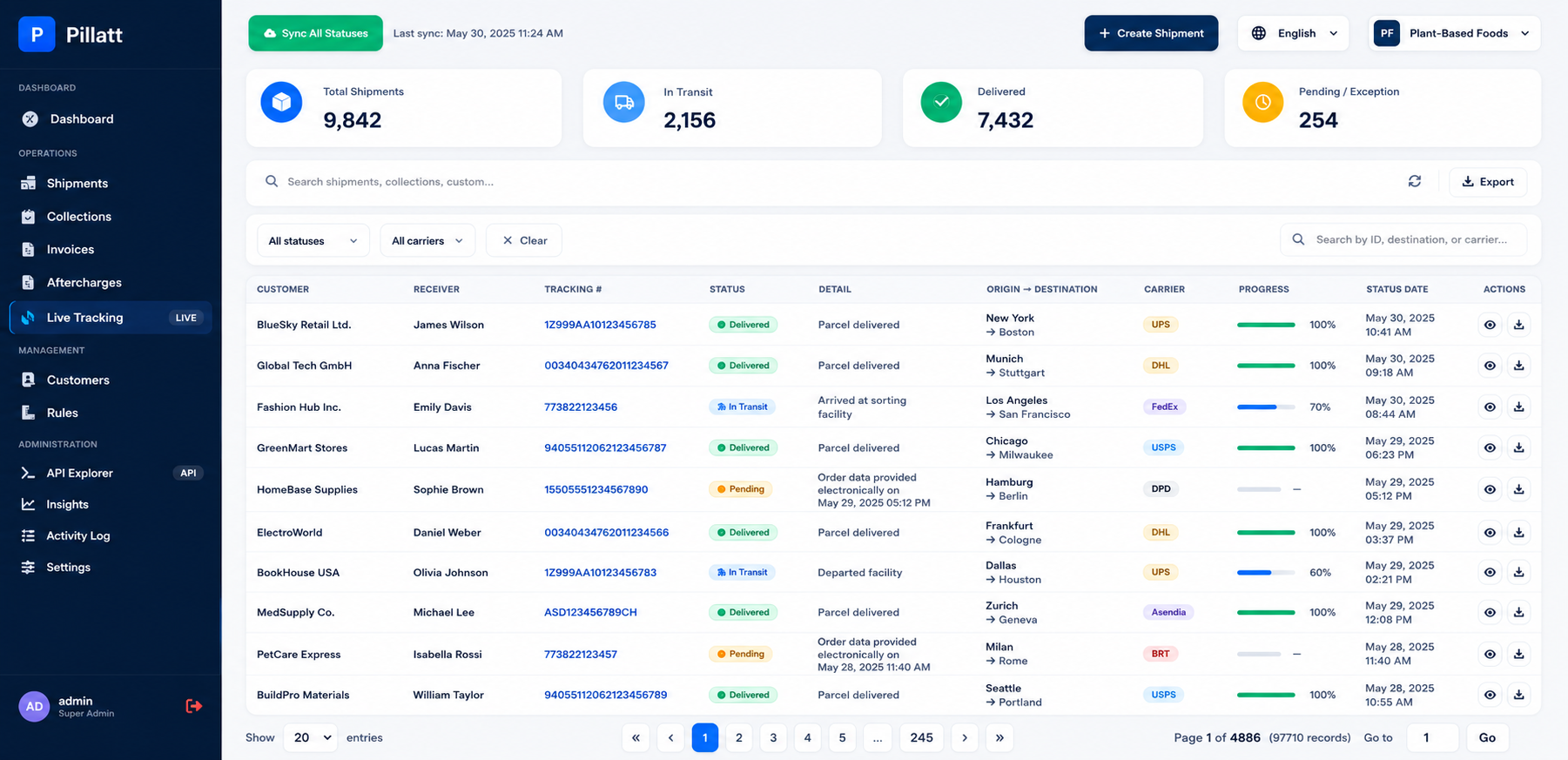

Banking, Logistics, Retail, Insurance and Manufacturing.
ASP.NET Core, .NET 8, WPF, SQL Server and REST APIs.
Looking to build, modernize or integrate a shipping platform with carrier APIs, tracking, labels, rates and logistics automation?