ERP INTEGRATION SERVICES

ERP Integration Services for Enterprise Business Systems ERP APIs, Data Mapping & Business Workflows

Custom ERP integration services using C# and .NET to connect ERP systems with existing applications, order management, inventory and shipping workflows. The integration approach is tailored to the available interfaces, business data and processing rules.

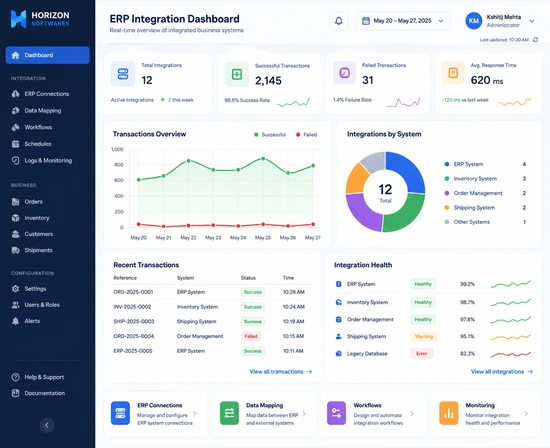
Custom Enterprise Software
Legacy .NET Modernization
API & System Integration
Desktop & Web Applications
15+ Years
Global Clients
Enterprise Solutions
Enterprise software solutions developed using Microsoft .NET
ERP Integration Services for Enterprise Business Systems
ERP
System Integration
C# / .NET
Integration
API
Connectivity
Orders
Business Data
SQL
Data Integration

Example ERP Integration Request and Response

The example below illustrates a possible ERP-to-application transaction using demonstration order data. It shows how an external order reference, customer and item details, and a shipping requirement can be represented in a request, followed by a response containing a processing status and integration reference. Actual request fields, validation rules and processing steps depend on the ERP system, the interfaces it exposes and the business workflow being integrated.

Illustrative ERP Order Request

{
  "externalReference": "DEMO-ORDER-001",
  "customer": {
    "customerCode": "DEMO-CUSTOMER-001"
  },
  "items": [
    {
      "sku": "DEMO-SKU-001",
      "quantity": 2,
      "unitPrice": 49.95
    }
  ],
  "shipping": {
    "required": true,
    "address": {
      "country": "DE",
      "postalCode": "12345"
    }
  },
  "sourceSystem": "ERP"
}

Illustrative Integration Response

{
  "success": true,
  "externalReference": "DEMO-ORDER-001",
  "integrationReference": "DEMO-INTEGRATION-001",
  "status": "Processed",
  "inventoryUpdated": true,
  "shippingRequested": true,
  "message": "ERP transaction processed successfully."
}
C# / .NET ERP Integration
API System Integration
Real-Time Data Exchange
Automated Business Workflows
SQL Database Integration
Scalable Enterprise Architecture
Multi-System Business Integration
Custom Integration Workflows
1. Identify the Source Transaction The example request identifies an ERP source, an external order reference, customer information and line-item data so the transaction can be associated with its origin.
2. Map Customer and Item Fields Customer codes, SKU values, quantities and prices illustrate the kinds of business fields that an integration may map between an ERP and a connected application.
3. Validate the Transaction Validate incoming field values and required business data against rules agreed for the source and destination systems before processing the transaction.
4. Represent Order Lines The sample line item demonstrates how a product identifier, quantity and unit price can be included in a structured order payload.
5. Carry Shipping Requirements The sample request includes a shipping-required flag and destination fields to illustrate how order data can pass into a connected shipping workflow when needed.
6. Return a Processing Result The sample response returns a status and message so the calling application can determine the outcome of the illustrated transaction.
7. Associate an Integration Reference An integration reference can associate the source transaction with its result, helping connected applications trace the exchange. The reference format depends on the implementation.
8. Trace the Transaction Outcome A production implementation should define how validation failures and external-system errors are recorded and surfaced for investigation. The JSON shown here is illustrative, not a live response.
Custom ERP Integration for Existing Business Systems

Custom ERP Integration for Existing Business Systems

Horizon Softwares develops custom ERP integration services using C# and .NET to connect ERP systems with existing business applications. Work begins by identifying the source and destination systems, available interfaces, data ownership and validation rules. Depending on the environment, integration may use supported APIs, application services or approved database access, with system-specific mapping and error handling kept within the integration layer.

1. Define the Data Flow — Identify which system owns each business field, where the data originates and which destination needs it.
2. Agree the Mapping Rules — Define field conversions, required values, identifiers and validation rules before exchanging data.
3. Select the Integration Interface — Confirm the ERP's supported APIs, services or approved data-access methods.
4. Validate Business Transactions — Check source references, customer or product identifiers, quantities and other required fields.
5. Connect Operational Workflows — Exchange the agreed order, inventory or shipping information with the connected applications.
6. Record Processing Outcomes — Return or persist integration references and statuses appropriate to the system design.
7. Diagnose Failed Exchanges — Separate validation, connectivity, authentication and response-processing failures.
8. Test the Integration Scope — Verify representative successful and unsuccessful transactions against the agreed business rules.
5.0 Rating 1 Verified Review
View on Clutch →
89+ Reviews 5.0 Average Rating
View on Freelancer →
ERP Integration
C# / .NET
API Integration
SQL / Data
Orders & Inventory
Shipping Integration
Synchronization
Automation

ERP Integration Workflows: APIs, Data Mapping & Synchronization

Integration design depends on the ERP system's available interfaces, data structures and business rules. The examples on this page illustrate common integration patterns; the implementation is tailored to the systems involved.

MODULE

How ERP Integration Connects Business Systems

ERP integration connects an ERP system with the applications that depend on its business data, such as order management, inventory and logistics software. The aim is to define a reliable path for information to move between systems while keeping each system's specific data model and rules within a clear integration boundary.

A typical workflow identifies the source transaction, validates required fields, maps the data into the destination application's model, performs the agreed business processing and returns a result that the calling system can interpret.

Typical flow:

Identify source data → validate → map fields → process business rules → exchange data with the destination system → record the outcome.

ERP Integration Services
C# / .NET Integration
API Connectivity
Business Data Mapping
Order Data Exchange
Inventory Workflows
Shipping Workflows
Integration Statuses
ERP Integration Services using C# and .NET
Kshitij Mehta - Senior Enterprise .NET Consultant

Helping Businesses Build Reliable Solutions

15+ Years Enterprise Experience
50+ Enterprise Projects
ASP.NET Core & WPF Expert
Long-Term Client Partnerships
More About Me

Enterprise Experience

Banking, Logistics, Retail, Insurance and Manufacturing.

Modern .NET Development

ASP.NET Core, .NET 8, WPF, SQL Server and REST APIs.

CONTACT INFORMATION

Let's Build Your ERP Integration

Need to connect an ERP system with shipping, inventory, order management or an existing business application?


Email kmehta@horizonsoftwares.net
Phone +91 94784 75547
Website horizonsoftwares.net
Location Serving Clients Worldwide
QUICK ENQUIRY

Tell Me About Your ERP Integration Project

Success
Message
WhatsApp Call Now